Protected Swings
 By LuxAlgoFeb 17, 2026
Protected Swings is an indicator on Vela, our next-generation charting platform, written in Pine Script®.
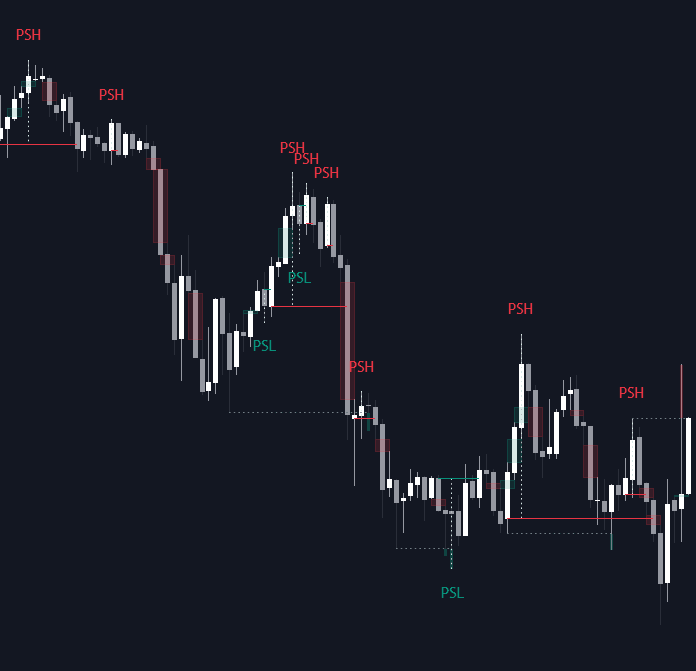

Protected Swings labels the swing highs and lows a trend should defend, the chart expression of strong and weak swings. A level earns its tag only after two things happen: liquidity is taken (a sweep through a prior extreme, or a tap into a fair value gap on the chart's own timeframe) and a candle body closes beyond the open of the candle run that built the swing, confirming a CISD, the moment the state of delivery flips. Wick breaks alone never qualify.
How to Trade the Protected Swings?
- PSH (Protected Swing High): price sweeps a high, then closes below the open of the up-close candle series that created it, a confirmed bearish shift in delivery.
- PSL (Protected Swing Low): the mirror, a swept low followed by a close above the open of the down-close series, confirming a bullish shift.
- Confirmation Levels: horizontal lines mark the exact price a body must close through, doubling as objective invalidation for stops.
- Trend continuation: once a trend is running, new protected swings form on retracements, stepping stones for trailing stops or scaling in.
With Include FVG Mitigations enabled, a move into a fair value gap can qualify a candidate even without a pivot sweep. For refined entries, confirm a protected swing on a higher timeframe, drop down, and wait for a lower-timeframe swing to confirm in the same direction.
Protected Swings Settings
- Sweep Sensitivity: bars required on both sides to confirm a structural pivot. Higher values keep only the stronger levels.
- Include FVG Mitigations: lets interactions with imbalances trigger the protected-swing logic. Gaps are only detected while Show Fair Value Gaps is on, so keep that toggle enabled for this to work.
- FVG Search Lookback: how many of the most recent fair value gaps the script keeps on the chart and checks for swing interactions, mitigated or not.
- Visualization: toggles for labels, confirmation levels, fair value gaps, sweep highlights, and colors.
Frequently Asked Questions
Free to use
Run it on Vela. Go further with a paid plan.
- Up to 500 strategy alerts, with webhook automation
- Up to 10× the chart history of Free
- Orderflow lookback up to full history
- More Quant usage to customize it, plus extra usage when you need it
- Futures data alongside crypto, stocks, forex and commodities
Also works on

Related indicators
Run it on Vela. Make it yours with Quant.
Open this indicator free on Vela, our next-generation charting platform. Then ask Quant, our coding agent built into Vela, to retune it or turn it into a backtested strategy of your own.