Structure Volume Profile Setups
 By LuxAlgoOct 1, 2026
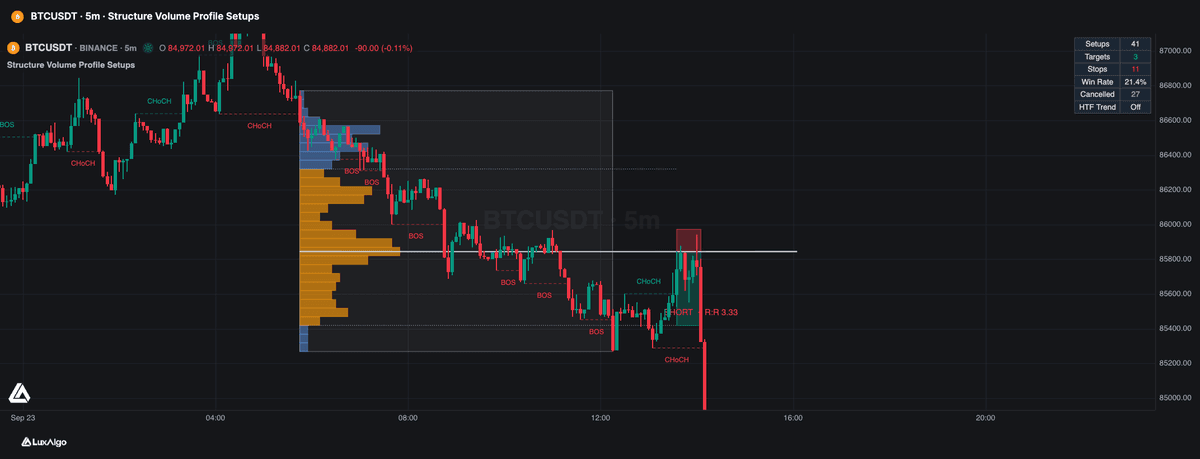

Structure Volume Profile Setups provides a systematic approach to identifying high-probability trading opportunities by combining objective market structure analysis with volume profile data. The indicator automatically detects trend transitions and consecutive structure breaks to highlight key price levels where significant volume distribution suggests potential support or resistance zones. By isolating specific legs of price action and calculating the Point of Control (POC) within those segments, traders can refine their entries, targets, and stop-loss levels based on real market participation rather than arbitrary price movements.
How to Trade the Structure Volume Profile Setups?
To trade using this indicator, start by identifying the market trend through the labels displayed on your chart. The tool identifies a Change of Character (CHoCH) and consecutive Breaks of Structure (BOS) to determine when a trend is sufficiently established. When a valid trend leg completes, the indicator generates a volume profile and marks the POC, which serves as your potential entry level.
The setup is designed for mean reversion or retracement trading. The indicator filters entries to ensure you are entering a pullback into the POC rather than chasing a breakout. If the market retraces to the POC, this marks your entry point. The provided target and stop-loss boxes are calculated based on either the Value Area (VA) or a set multiple of the Average True Range (ATR).
You can further refine your trades using the Higher Timeframe (HTF) trend filter, which ensures your entries are taken only in the direction of the dominant market trend. When a setup is active, watch for the projected target and stop boxes to manage your position. If a new structure break occurs or if price conditions change, the indicator may void a pending setup, helping you avoid trades that no longer align with the current market structure.
Structure Volume Profile Setups Settings
Setup
- Swing Length: Adjusts the pivot lookback period to detect swing points. Larger values identify longer, more significant trends.
- Consecutive BOS Required: Sets the number of required structure breaks before the indicator acknowledges a trend, filtering out noise.
- HTF Trend Filter: Limits setups to the direction of the trend on a selected higher timeframe, determined by an exponential moving average.
- Skip Setups Containing Gaps: When enabled, this ignores price legs containing large gaps that might indicate abnormal liquidity conditions.
- Require Retracement Into POC: Forces the indicator to only provide setups where the current price is moving back toward the POC, ensuring a retracement entry.
- Profile Rows: Determines the granularity of the volume profile. Higher values provide a more precise POC.
- Value Area %: Defines the percentage of volume that constitutes the value area for setting target levels.
Trade
- Target Mode: Choose between using the Value Area High/Low or a fixed ATR distance for profit taking.
- Target (ATR): Multiplier for the profit target when ATR mode is selected.
- Stop (ATR): Multiplier for the stop-loss distance based on the ATR.
- Cancel Pending Entry On New CHoCH: If enabled, any pending setup is automatically invalidated if the market structure changes before the entry is hit.
- Pending Entry Expiry: The number of bars a setup remains valid before it is removed from the chart.
Frequently Asked Questions

The Library is free. Quant makes it yours.
Pull any concept or indicator into Quant: rebuild it, retune it, or turn it into a backtested strategy of your own.