All indicators

Swing Failure Pattern (SFP)

By LuxAlgoApr 18, 2024

Static chart image
Volume BasedLiquidityPatterns

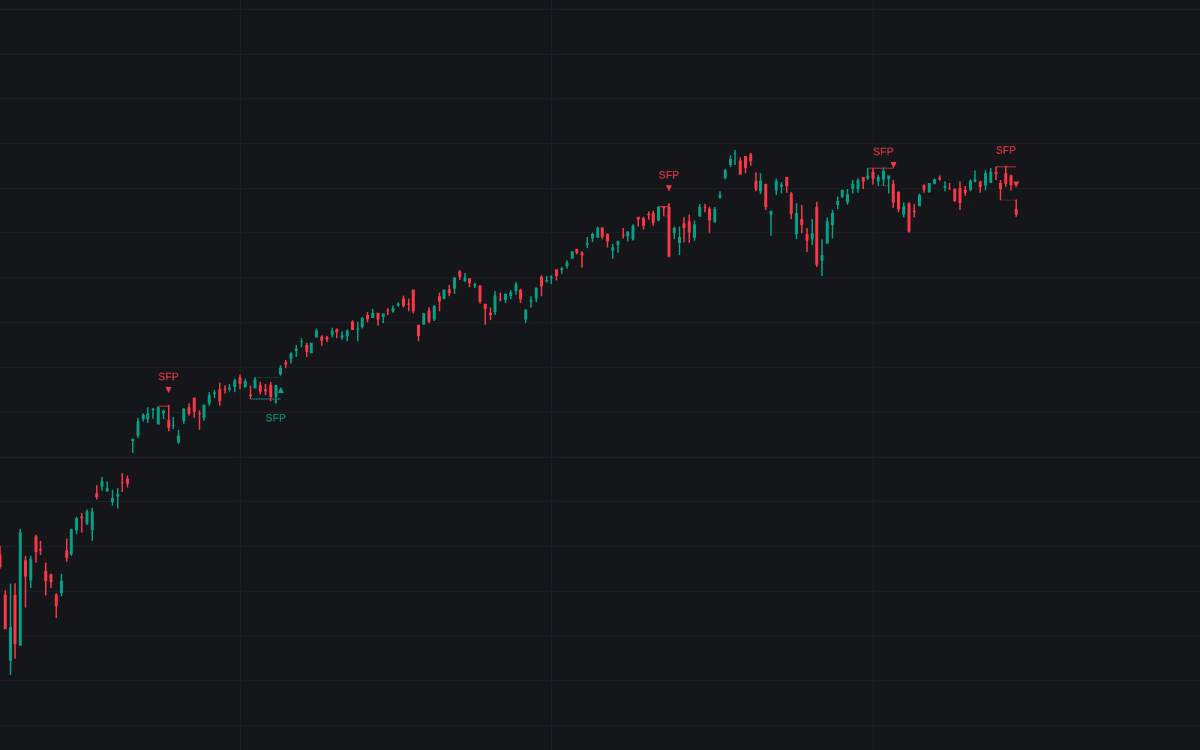
The Swing Failure Pattern indicator is an exceptional tool designed to highlight Swing Failure Patterns (SFP) on your trading chart. This unique pattern emerges when significant market participants drive liquidity, making it a potential signal for trend reversals. The indicator also features a Confirmation level for validating trend reversals and enables users to filter out SFPs based on a set Volume % Threshold.

How to Use the Swing Failure Pattern Indicator?

indicator image

Swing Failure Patterns occur when a candle wick breaks above or below a recent swing level, only to close back within the previous level. This phenomenon often takes place due to significant market players who engineer liquidity to entice other traders. Spotting SFPs can help traders identify potential shifts in market trends.

indicator image

In the chart, SFPs are highlighted using labels and accentuated wick lines, which traders can disable if they wish.

indicator image

Increasing the "Swings" period won't change the SFP but may reduce the frequency of their detection.

Understanding the Confirmation Level

The confirmation level acts as a checkpoint for verifying trend reversals after an SFP. For a bullish SFP, it's the highest point between the previous swing and the SFP, whereas for a bearish SFP, it's the lowest point. If the price breaks this level, it serves as a confirmation of a trend reversal.

indicator image

A triangle icon will appear whenever the price closes beyond the confirmation level, giving traders visual confirmation.

indicator image

Traders with a contrarian mindset might use the SFP as an entry point while using the confirmation level to set profit targets or stop losses. Below is a scenario illustrating this approach:

indicator image

Managing Volume with Volume % Threshold

The Volume % Threshold setting lets traders filter SFPs by assessing the cumulative volume outside the swing level against the total candle volume:

  • Volume outside swing < Threshold: Ensures the volume outside the swing is less than a set percentage of total candle volume, preventing excessive liquidity generation.
  • Volume outside swing > Threshold: Ensures the volume outside the swing exceeds a set percentage, requiring significant liquidity events.
  • None: No additional filter is applied.

indicator image

As shown above, if the volume above the swing level exceeds the threshold, the SFP will not be highlighted. Adjusting the setting to "Volume outside swing > Threshold" will reverse this condition.

indicator image

Volume outside the Swing level is calculated using intrabar - Lower TimeFrame (LTF) data. When the Volume % Threshold filter is in play, a vertical line will denote the maximum period where intra-bars are available.

indicator image

Technical Details

Understanding LTF Settings

When the 'Auto' option is activated in settings, the LTF is selected as the nearest lower timeframe based on the current TF. For users without the Premium plan, the minimum TF is locked to 1 minute to avoid errors. For example, if the current TF is Daily:

  • At 500: LTF is 3 minutes
  • At 1500 (default): LTF is 1 minute
  • At 5000: LTF would be 30 seconds (1 minute if Premium is off)

The LTF can be viewed at the upper-right corner of the interface.

Configuration Settings

Here’s a breakdown of the settings you can tweak for optimal usage:

  • Swings: Period length for swing detection. Longer periods provide for long-term swing levels.
  • Bullish SFP: Toggle this to either show or hide bullish Swing Failure Patterns.
  • Bearish SFP: Toggle this to either show or hide bearish Swing Failure Patterns.

Validating with Volume

To validate volume, use the following options:

  • Volume outside swing < Threshold: Ensures volume is below a set percentage.
  • Volume outside swing > Threshold: Ensures volume is above a set percentage.
  • None: No validation check is applied.

Set your Volume % Threshold according to total candle volume requirements.

  • Auto + multiple: Adjusts the initially set LTF for precision.
  • LTF: Select your preferred LTF setting.
  • Premium: Turn on if your TradingView subscription is Premium or higher for more features.

Dashboard Options

  • Show Dashboard: Toggle the display for the applied Lower Timeframe (LTF).
  • Location: Set where the dashboard appears.
  • Size: Adjust the size of the dashboard to preference.

Style Customizations

  • Swing Lines: Customize these lines as per your trading style.
  • Confirmation Lines: Adjust settings for better clarity.
  • Swing Failure Wick: Personalize color based on preference.
  • Swing Failure Label: Labels can be customized for better visibility.
  • Lines / Labels: Select color configurations for lines and labels.
  • SFP Wicks: Customize your swing failure wick line colors.

FAQ

How do I access the Swing Failure Pattern indicator?

You can get access on the LuxAlgo Library for charting platforms like TradingView, MetaTrader (MT4/MT5), and NinjaTrader for free.

What is the Swing Failure Pattern indicator used for?

It is designed to highlight Swing Failure Patterns, which can be an indication of potential trend reversals due to liquidity generation by market participants.

Can I customize the settings in the Swing Failure Pattern indicator?

Yes, various settings like Swing period, Volume % Threshold, and others can be customized to suit different trading strategies.

Free indicator

Get free access to this indicator on the platforms below.

TradingView
NinjaTrader
MetaTrader 4/5

Unlock the entire LuxAlgo Library

Every indicator, every strategy, full charts, and complete access to Quant — our AI agent.