Embedded Readings
 By LuxAlgoApr 28, 2026
Embedded Readings is an indicator on Vela, our next-generation charting platform, written in Pine Script®.
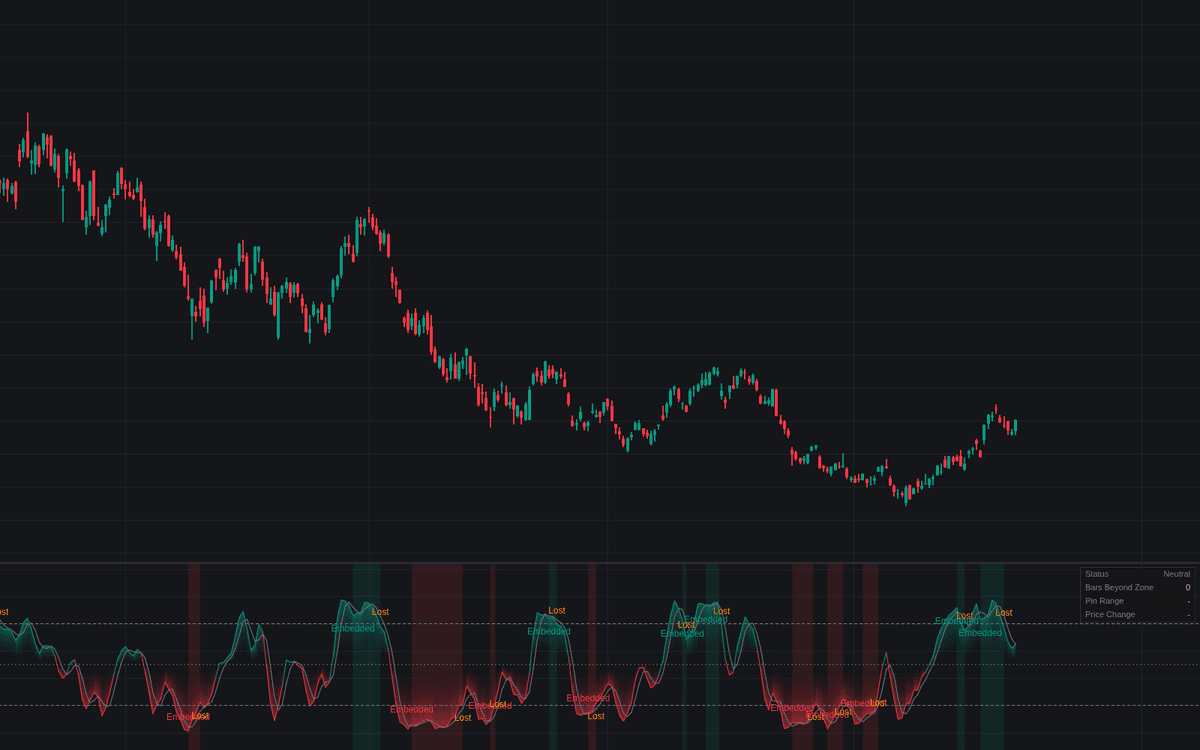

Embedded Readings flags the moment a bounded oscillator stops oscillating (pinned beyond its extreme threshold bar after bar while a trend runs), so embedded readings are declared by rule instead of judgment. Consecutive closes beyond the extreme zone are counted, and a spike that turns back inside resets the count, so only a genuinely pinned line reaches the threshold. An Embedded label prints where the run completes, the pane tints while the state holds, and a Lost label marks the first close back inside the range.
How to Trade the Embedded Readings?
- Embedded High / Embedded Low: extreme readings now confirm trend strength. Counter-trend signals from this oscillator stay on hold while the pin lasts.
- Embedding Lost: the first close back inside the normal range is a caution flag for risk management, explicitly not a reversal signal.
- Dashboard: Status (Embedded, Forming with its count, or Neutral), Bars Beyond Zone, Pin Range (small near the extreme is the pinned signature) and Price Change across the run.
Embedded Readings Settings
- Oscillator (default Stochastic): also RSI or Williams %R, shifted to the shared 0-100 scale.
- Source (default close) and Length (default 14): series and lookback feeding the oscillator.
- %K Smoothing (default 3) and %D Length (default 3): Stochastic only, the classic slow pairing.
- Bars To Embed (default 3): consecutive closes beyond the threshold before embedding is flagged.
- Require Both %K And %D (default on): the classic working rule, or track %K alone.
- Extreme Thresholds (default Auto): 80/20 for Stochastic and Williams %R, 70/30 for RSI; Custom Upper Threshold (default 80) and Custom Lower Threshold (default 20) apply in Custom mode.
- Display: Show Dashboard, Transition Labels, Embedded Regime Background and Show %D Line (all on).
Frequently Asked Questions
Free to use
Run it on Vela. Go further with a paid plan.
- Up to 500 Custom Alerts, with webhook automation
- Up to 10× the chart history of Free
- Orderflow lookback up to full history
- More Quant usage to customize it, plus extra usage when you need it
- Futures data alongside crypto, stocks, forex and commodities

Related indicators
Run it on Vela. Make it yours with Quant.
Open this indicator free on Vela, our next-generation charting platform. Then ask Quant, our coding agent built into Vela, to retune it or turn it into a backtested strategy of your own.