Gann Box
 By LuxAlgoFeb 22, 2026
Gann Box is an indicator on Vela, our next-generation charting platform, written in Pine Script®.
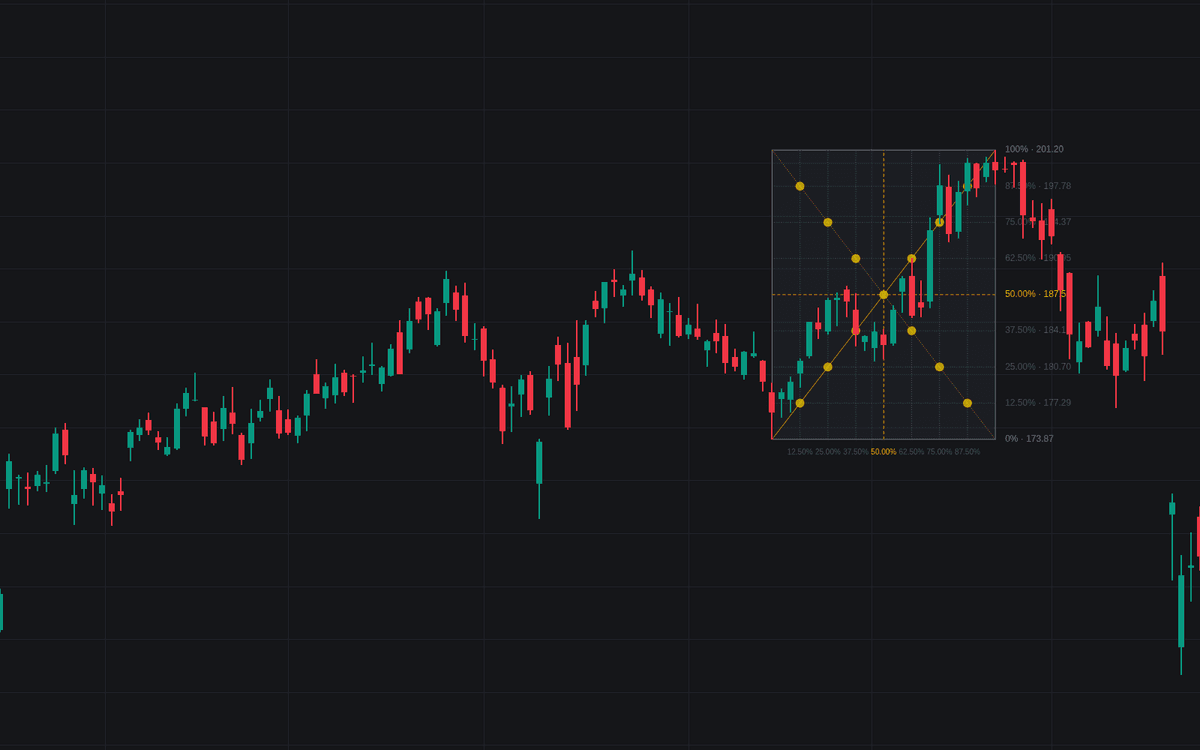

Gann Box frames a swing inside a rectangle and divides it in both dimensions at once: horizontal lines split the price range into fixed fractions, vertical lines split the elapsed time the same way, and corner diagonals tie the two together. It is a disciplined take on the Gann Box: reproducible anchors, explicit fraction schemes, and alerts on every level interaction.
How to Trade the Gann Box?
- Internal level crossings: closes through a price division; the 50% midline, drawn in its own color, typically draws the most attention.
- Box edge breaks: a close above the top or below the bottom ends the range read; with Extend Price Levels Right on, the edges and divisions carry forward as breakout and retest references.
- Time divisions: with Project Time Grid Forward on, the time rhythm repeats one box-width ahead as timing windows; reaching one fires an alert.
- Squaring points: dots where the diagonals cross the grid, the bars where the elapsed-time fraction matches the price fraction.
Gann Box Settings
- Anchor Mode (default Auto (Swings)); Swing Length (default 20): bars each side a point must dominate. Larger anchors the box on more significant swings.
- Anchor Source (default Wicks): corners on highs/lows or on closes; keep one convention so boxes stay reproducible.
- Range Start / Range End (defaults 1 Jan 2026 / 1 Mar 2026): the window scanned in Manual (Range) mode. It only needs to bracket the swing.
- Divisions (default Eighths): Quarters, Thirds, Halves or Fibonacci (23.6/38.2/50/61.8/78.6%) as alternatives.
- Corner Diagonals (on), Diagonal Intersections (on), Extend Price Levels Right (off), Project Time Grid Forward (off), Price Labels and Time Labels (on).
- Border, fill, grid, midpoint and diagonal colors plus Label Size (default Small) are cosmetic.
Frequently Asked Questions
Free to use
Run it on Vela. Go further with a paid plan.
- Up to 500 Custom Alerts, with webhook automation
- Up to 10× the chart history of Free
- Orderflow lookback up to full history
- More Quant usage to customize it, plus extra usage when you need it
- Futures data alongside crypto, stocks, forex and commodities

Original indicatorBuilt in-house by LuxAlgo
Related indicators
.png&w=3840&q=75)
Run it on Vela. Make it yours with Quant.
Open this indicator free on Vela, our next-generation charting platform. Then ask Quant, our coding agent built into Vela, to retune it or turn it into a backtested strategy of your own.