Point & Figure
 By LuxAlgoJun 7, 2026
Point & Figure is an indicator on Vela, our next-generation charting platform, written in Pine Script®.
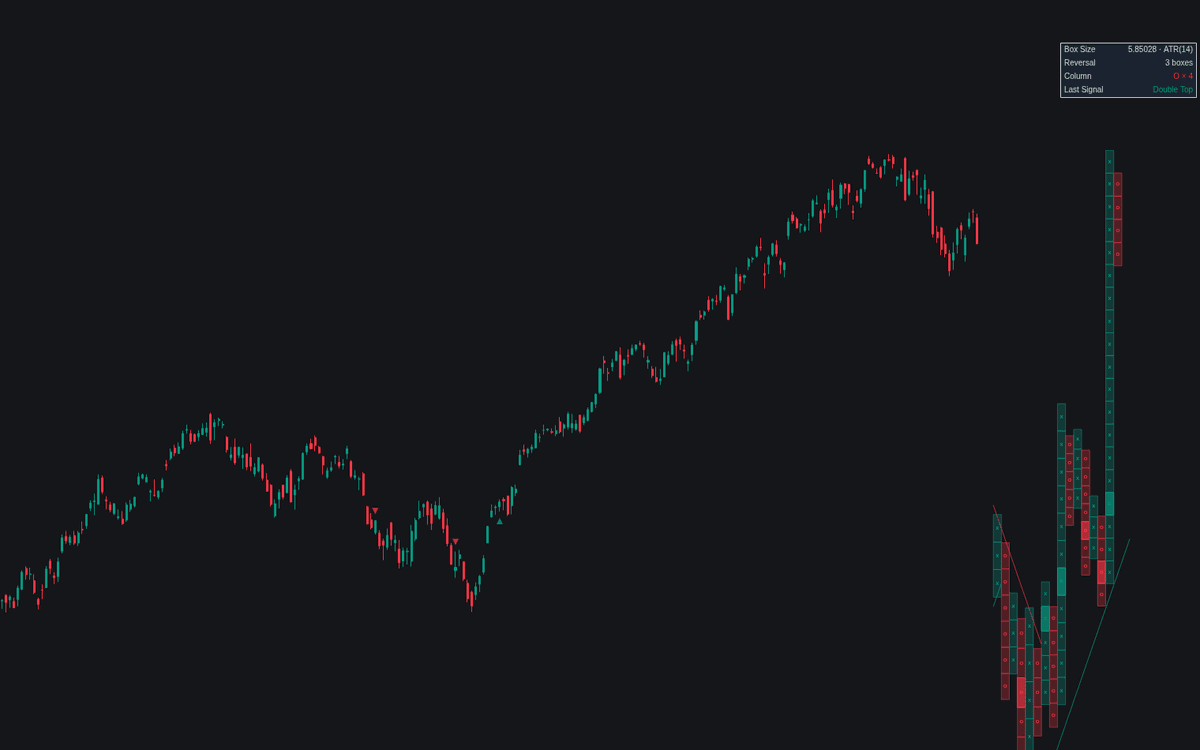

Point & Figure rebuilds the venerable time-independent charting method as a live overlay: alternating X and O columns drawn beside the last price bar, advancing only on a full box and reversing only after a 3-box retrace by default. The definitive clean build of Point & Figure keeps the classic high/low construction, prints double and triple signals mechanically, and carries the counting arithmetic as live objective levels.
How to Trade the Point & Figure?
- Double top / bottom signals: a column printing one box past the previous same-direction column's extreme, highlighted, with a triangle on the price bar.
- Triple top / bottom signals: a break past two matching column extremes, marked with diamonds.
- 45° trendlines: bullish support rises one box per column from bottoms, bearish resistance falls from tops, flipping when pierced.
- Count objectives: vertical counts project from a breakout column's height, horizontal counts from congestion width, estimates removed once reached or negated.
Alerts cover column reversals and all four breakouts; the dashboard shows box size, reversal, current column, and last signal.
Point & Figure Settings
- Construction (default High/Low): highs extend rising columns, lows falling ones; Close uses closing prices only.
- Box Size Method (default ATR), ATR Length (default 14), Percent Box (%) (default 1), Fixed Box (default 1): sizes the minimum move per mark.
- Reversal Boxes (default 3): the retrace that starts an opposite column. Raise to filter more noise.
- Highlight Breakout Boxes, Chart Signal Markers, 45° Trendlines, Vertical Counts, Horizontal Counts (default enabled), Column Reversal Markers (default disabled): which signals and overlays draw.
- Max Columns (default 40), Column Width (default 2), Offset (default 4), Marks (default X / O), Dashboard (default enabled): rendering controls.
Frequently Asked Questions
Free to use
Run it on Vela. Go further with a paid plan.
- Up to 500 Custom Alerts, with webhook automation
- Up to 10× the chart history of Free
- Orderflow lookback up to full history
- More Quant usage to customize it, plus extra usage when you need it
- Futures data alongside crypto, stocks, forex and commodities

Related indicators
Run it on Vela. Make it yours with Quant.
Open this indicator free on Vela, our next-generation charting platform. Then ask Quant, our coding agent built into Vela, to retune it or turn it into a backtested strategy of your own.