Swiss Army Knife Filter
 By LuxAlgoJun 24, 2026
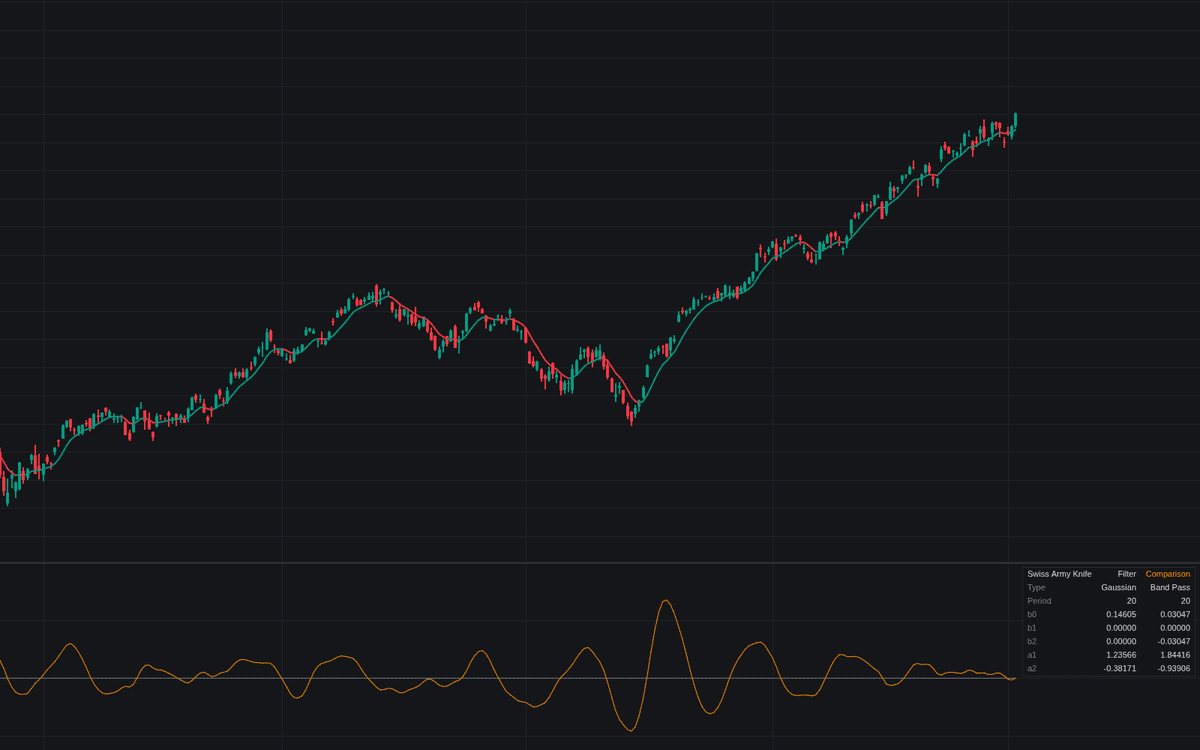

Swiss Army Knife Filter is one filter wearing seven outfits: a single second-order recursion whose behavior is decided entirely by its coefficient set, the Swiss Army Knife filter realized as published. Gaussian (the default), EMA, Butterworth and Band Stop follow price on the main chart; High Pass, 2 Pole High Pass and Band Pass draw as centered oscillators in the pane, detrending the source or isolating one cycle wavelength. The coefficient table prints the five live values (b0, b1, b2, a1, a2), the running filter's complete definition.
How to Trade the Swiss Army Knife Filter?
- Price-domain types: the source crossing the filter line is the basic event, alerted both ways, with optional triangle markers.
- Oscillator types: zero crossings mark the detrended series or isolated cycle changing sign, likewise alerted.
- Honest comparison: the comparison instance runs a second coefficient set through the identical routine on the same source. Output differences are filter response, not implementation quirks.
Swiss Army Knife Filter Settings
- Source (default close): series fed to the recursion.
- Filter Type (default Gaussian): the coefficient row: EMA, Gaussian, Butterworth, High Pass, 2 Pole High Pass, Band Pass or Band Stop.
- Period (default 20): cutoff period of the low- and high-pass rows, center wavelength of the band rows.
- Bandwidth (default 0.1): half-bandwidth of the band rows. Narrower is more selective but rings longer; ignored by other types.
- Enable Comparison Filter (default off) with Type (default Band Pass) and Period (default 20); bandwidth is shared.
- Show Coefficient Table (default on) with Location (Top Right) and Size (Small); Line Width (default 2), Crossing Markers (default off).
Frequently Asked Questions

Original indicatorBuilt in-house by LuxAlgo
The Library is free. Quant makes it yours.
Pull any concept or indicator into Quant: rebuild it, retune it, or turn it into a backtested strategy of your own.