Wyckoff Wave & Volume Studies
 By LuxAlgoFeb 11, 2026
Wyckoff Wave & Volume Studies is an indicator on Vela, our next-generation charting platform, written in Pine Script®.
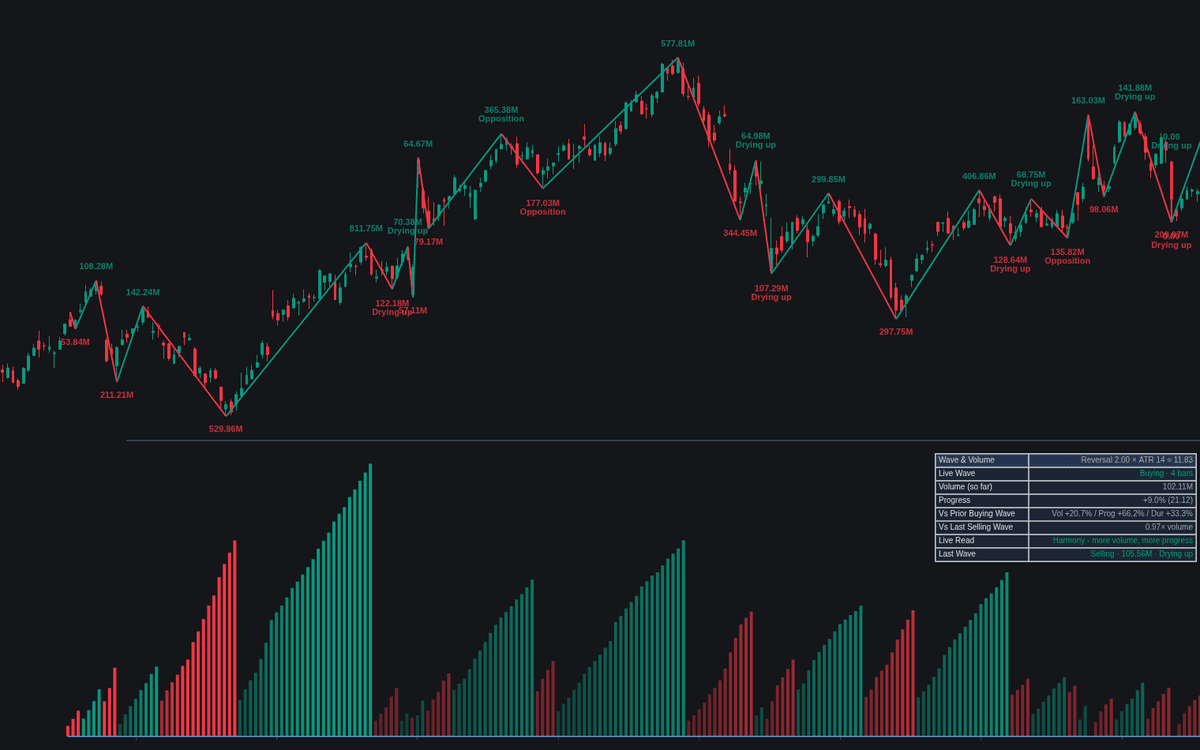

Wyckoff Wave & Volume Studies is the definitive clean build of Wyckoff wave and volume studies, the tape compressed into comparable units of effort. Price splits into alternating buying and selling waves at a reversal threshold (ATR-scaled by default), and each wave accumulates its volume. The pane plots the live wave's total as columns shaded against the heaviest recent wave; completed totals print at the swing extremes, joined by a zigzag on the price chart.
How to Trade the Wyckoff Wave & Volume Studies?
- Opposition: more volume yet less progress than the prior same-direction wave, the absorption warning.
- Drying up: less volume and less progress, that side's pressure fading.
- Harmony / ease: more volume with more progress, or more ground on less volume, continuation reads.
Act on completed waves: until a reversal covers the full threshold distance, the last wave can still absorb what looked like a new swing, hence the thin, dotted provisional leg and its faded volume total.
Wyckoff Wave & Volume Studies Settings
- Reversal Threshold (default ATR Multiple): how the wave-ending distance is measured; Percentage and Points are alternatives.
- ATR Multiple (default 2.0) and Length (default 14): the ATR threshold and averaging length.
- Reversal Percentage (default 1.0) and Reversal Points (default 10.0): the other modes' thresholds.
- Wave Source (default Wicks): highs and lows feed waves; Close ignores wicks.
- Comparison Tolerance % (default 0): changes below this count as similar; 0 is strict.
- Tag Wave Reads (default on): tags Opposition or Drying up on completed labels.
- Label Detail (default Volume): the full option adds progress and duration.
- Display: Show Dashboard, Wave Zigzag on Chart, Show Provisional Wave, Wave Volume Labels, Shade Columns by Relative Volume (all on by default), Zigzag Width (default 2), Label Size (default Small).
Frequently Asked Questions
Free to use
Run it on Vela. Go further with a paid plan.
- Up to 500 Custom Alerts, with webhook automation
- Up to 10× the chart history of Free
- Orderflow lookback up to full history
- More Quant usage to customize it, plus extra usage when you need it
- Futures data alongside crypto, stocks, forex and commodities

Related indicators
Run it on Vela. Make it yours with Quant.
Open this indicator free on Vela, our next-generation charting platform. Then ask Quant, our coding agent built into Vela, to retune it or turn it into a backtested strategy of your own.