D-Shape Breakout Signals
 By LuxAlgoAug 29, 2024
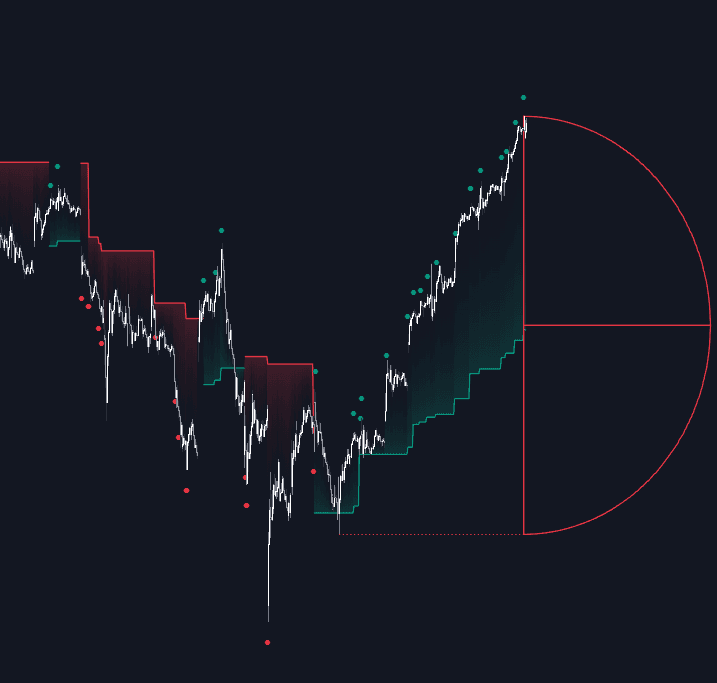
D-Shape Breakout Signals turns support and resistance into geometry. The distance between two swing points defines a semi-circular arc — the "D" — and that curve, not a horizontal line, becomes the breakout boundary. Each shape resolves exactly once: through the top, through the bottom, or expiring at its right edge. The approach shares DNA with arc-based fib geometry tools, which likewise scale curved reaction zones from swing distances.
How to Trade the D-Shape Breakout Signals?
- Green dot: price broke above the arc; the shape recolors green and the resolution is bullish.
- Red dot: the arc broke to the downside; the shape recolors red.
- Blue dot: a Neutral Breakout — price reached the arc's right edge without crossing either boundary, and the shape turns blue.
- Trailing stop-loss line: after a confirmed break, the midline of the broken D-shape nearest to price becomes the TSL, updating only with new highs or lows in the breakout's direction — usable as a stop, an entry reference, a support/resistance level, or a trend gauge.
One signal per shape keeps the chart honest: resolved arcs age out under your minimum-pattern budget while active ones keep working, and the width you choose moves both the detection line and the eventual stop placement.
D-Shape Breakout Signals Settings
- Swing Length: the detection period for the swing highs and lows that anchor each shape.
- Minimum Patterns: the minimum number of D-shapes kept visible before older ones are cleared.
- D-Width: arc width as a percentage of the distance between swing points.
- Included Swings: build shapes from Swing Highs, Swing Lows, or Both.
- Style Historical Patterns: display resolved shapes as Arc, Midline, or Both — plus label sizing, a connecting swing-level line, and TSL color fill.
Frequently Asked Questions
What does a Neutral Breakout tell me?
That price ran out of room: it reached the right edge of the arc without breaking either side. The shape turns blue and the trailing stop line deliberately holds its level, preserving the prior trend read rather than flipping on ambiguity.
How does it compare with level-based breakout tools?
Tools like Breakouts with Tests & Retests confirm horizontal levels. Here the boundary is curved, so the breakout threshold changes as the shape matures rather than staying flat — different geometry for the same trading question.
How do I access D-Shape Breakout Signals?
The indicator is free in the LuxAlgo Library. Running or backtesting it in Quant — LuxAlgo's AI — takes one click from this page.
Free indicator
Get free access to this indicator on the platforms below.

The Library is free. Quant makes it yours.
Pull any concept or indicator into Quant: rebuild it, retune it, or turn it into a backtested strategy of your own.