ultrapremiumultimate
LuxAlgo - Screener (S&O)
 By LuxAlgoFeb 20, 2024
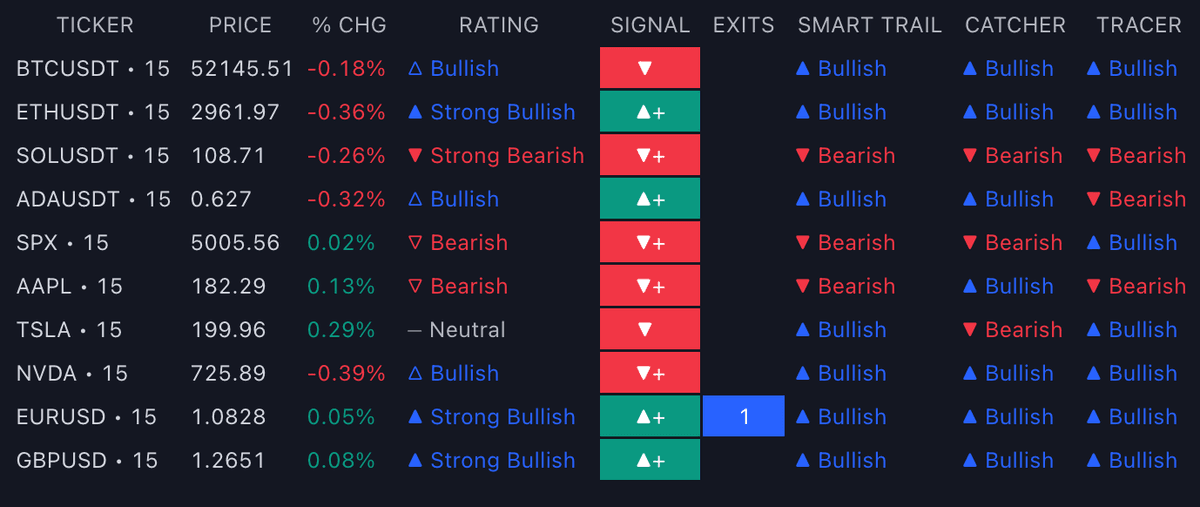
The LuxAlgo® - Screener (S&O) puts the Signals & Overlays™ toolkit's readings for an entire watchlist into one table: up to 10 tickers, each on its own timeframe, refreshed on your chart without switching symbols. It is built for traders who already run the toolkit and want to find which market is actually presenting a setup right now, rather than flipping through charts. Access rides along with the toolkit itself: having Signals & Overlays™ automatically grants the S&O screener.
What's Inside the Screener (S&O)?
- Market columns: Price, Volume, %Change, and Change give each row its market context before any toolkit data is read.
- Signal: the most recent Confirmation or Contrarian signal returned on the ticker, backed by an Exits column counting exit signals since that signal fired, a quick read on how mature the move already is.
- Overlay status columns: current Smart Trail, Reversal Zones, Trend Catcher, Trend Tracer, and Neo Cloud states reproduce the toolkit's overlay stack per ticker, so cross-ticker confluence is visible at a glance.
- Dashboard metrics: current Trend Strength, Lux Volatility, Squeeze Index, and Volume Sentiment values mirror the toolkit dashboard for every row.
- Rating: a per-ticker confluence score computed from the percentage of bullish indications across the enabled elements: ▲ Strong Bullish above 80%, △ Bullish at 60–80%, ― Neutral at 40–60%, ▽ Bearish at 20–40%, ▼ Strong Bearish under 20%.
- Filtering: every element carries its own filter dropdown; list-based elements filter to a precise option while value-based elements use Above/Below operators (Lux Volatility excepted), and conditions on multiple elements combine so only tickers matching all rules stay visible.
- Sorting: rows order ascending or descending by Rating, Trend Strength, Lux Volatility, Squeeze Index, Volume Sentiment, or Exits, with None preserving the ticker-settings order.
- Placement: the screener renders in its own pane by default with six position options (Top/Bottom Center, Right, Left) and can be dragged directly onto the price chart for a compact layout.
How to Trade with the Screener (S&O)?
- Scan for confluence first: sort by Rating descending and the tickers where most enabled S&O elements agree float to the top, the shortlist for a closer chart look.
- Filter down to your setup: keep only rows rated △ Bullish or ▲ Strong Bullish, or stack rules such as Trend Strength Above 50 with a bullish Smart Trail, so the table only ever shows candidates matching your plan.
- Use Exits as a freshness check: a signal with zero exits since firing is early; several accumulated exits mark a move that has already paid out repeatedly.
- Run multi-timeframe confirmation: the same ticker can occupy several rows on different timeframes, turning the screener into an alignment matrix for one instrument.
- Execute on the chart, not the table: once a row qualifies, open that symbol with the full toolkit applied. The screener finds the candidate, and if the rule set proves durable it can graduate to the S&O Backtester for statistical validation.
Key Settings & Modes
- Tickers: 10 slots with per-ticker timeframe overrides; defaults span crypto (BTCUSDT, ETHUSDT, SOLUSDT, ADAUSDT), indices and stocks (SPX, AAPL, TSLA, NVDA), and forex (EURUSD, GBPUSD). Duplicate ticker/timeframe pairs are dropped.
- Screener Elements: enable/disable toggles, color controls, and the per-element filter dropdowns.
- Signal settings group: signal sensitivity and the choice between Confirmation and Contrarian algorithms for the Signal column.
- Overlays settings group: a 1–5 setting per overlay, with higher values reading longer-term trends.
- Location: pane position selection, plus drag-and-drop onto the chart.
- Sorting: sorted element and ascending/descending order.