Seek & Destroy Profile
 By LuxAlgoJun 25, 2026
Seek & Destroy Profile is an indicator on Vela, our next-generation charting platform, written in Pine Script®.
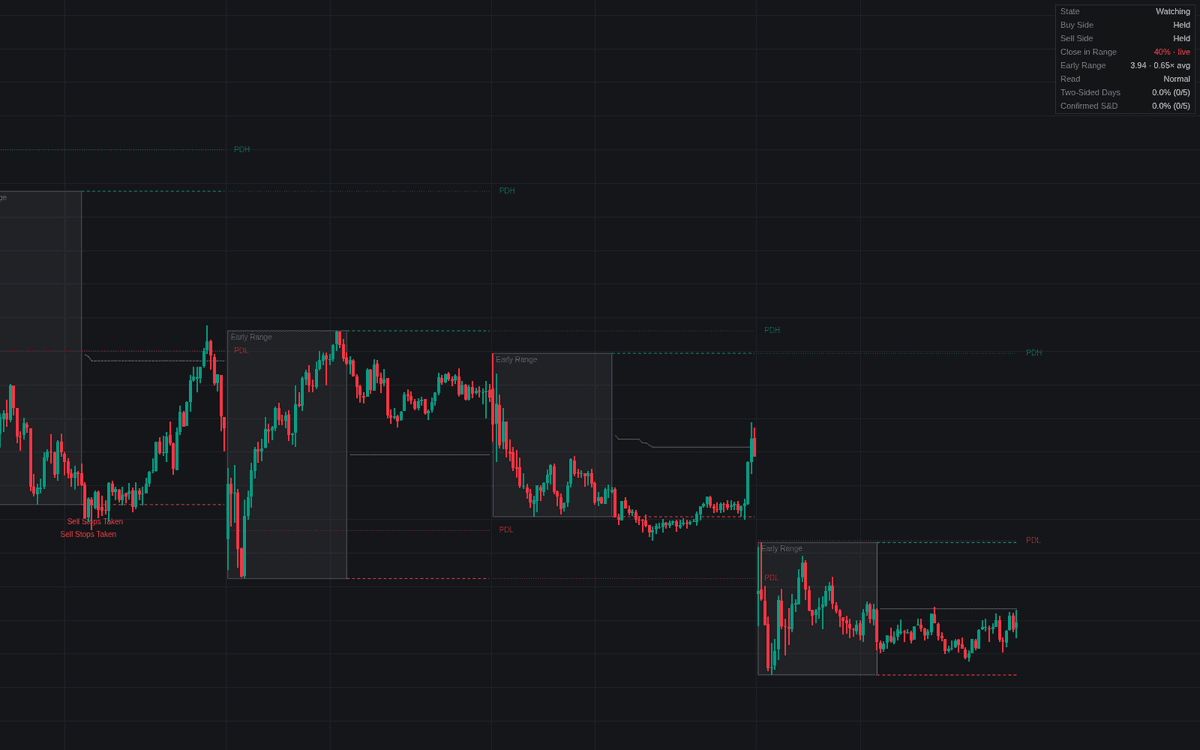

Seek & Destroy Profile is the definitive clean detector for the seek & destroy profile, the day that takes the stops on both sides yet commits to neither. It freezes an early range (00:00-08:30 New York time by default), arms its extremes (plus the prior day's high and low when outside it) and judges the evaluation window bar by bar: a wick through a level that closes back inside is a sweep; closes holding beyond it are acceptance, a genuine breakout.
How to Trade the Seek & Destroy Profile?
- Buy Stops Taken / Sell Stops Taken: a reference level was run and rejected: a caution flag after one side, the working assumption after both.
- Seek & Destroy · Developing: both sides swept without acceptance; the background shades and the dashboard read flips to stand aside.
- Confirmed vs unconfirmed: a final close inside the middle band completes the signature; a two-sided day settling away from it stays unconfirmed.
- Invalidation: acceptance beyond any level reclassifies the day as a directional breakout, with its own alert.
The dashboard tracks the close's range position, early-range width versus average, and two-sided and confirmed base rates.
Seek & Destroy Profile Settings
- Timezone (default America/New_York).
- Early Range (default 0000-0830): source of the primary reference levels.
- Evaluation Window (default 0830-1600): where sweeps count and the day is judged.
- Prior Day High/Low (default enabled): arms PDH and PDL when outside the early range.
- Acceptance Closes (default 2): consecutive closes beyond a level that read as breakout.
- Displacement Multiplier (default 1) with ATR Length (default 14): one displaced close also invalidates; 0 disables the test.
- Middle Close Band % (default 33): how central the final close must land to confirm.
- Early Range Width Average (default 20), plus box, level-line, midpoint, label, shading, and dashboard toggles.
Frequently Asked Questions
Free to use
Run it on Vela. Go further with a paid plan.
- Up to 500 Custom Alerts, with webhook automation
- Up to 10× the chart history of Free
- Orderflow lookback up to full history
- More Quant usage to customize it, plus extra usage when you need it
- Futures data alongside crypto, stocks, forex and commodities

Related indicators
.png&w=3840&q=75)
Run it on Vela. Make it yours with Quant.
Open this indicator free on Vela, our next-generation charting platform. Then ask Quant, our coding agent built into Vela, to retune it or turn it into a backtested strategy of your own.