Triangle
 By LuxAlgoJun 30, 2026
Triangle is an indicator on Vela, our next-generation charting platform, written in Pine Script®.
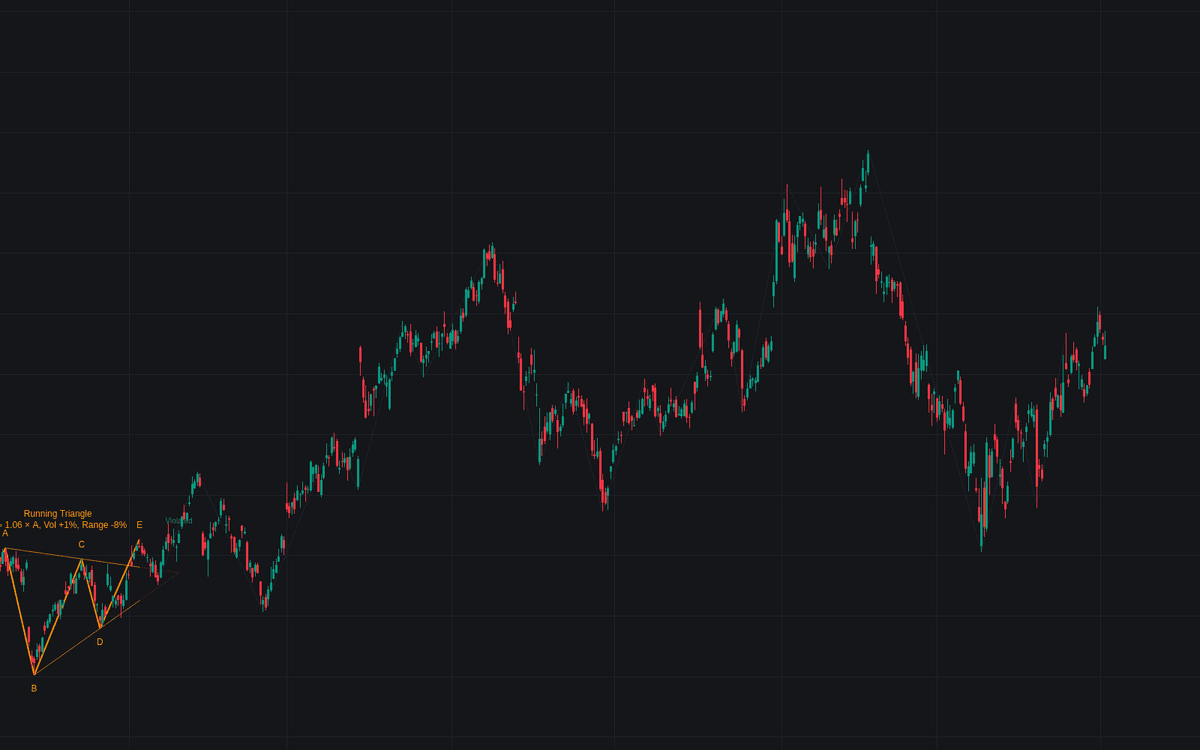

Triangle reads the five-legged sideways structure as a wave analyst counts it. Six alternating swing points become A through E, boundaries fit through A-C and B-D, and the shape must satisfy the grammar of the Elliott triangle: converging boundaries with shrinking legs (contracting), one flat boundary (barrier), diverging legs (expanding), or a wave B exceeding the start of A (running).
How to Trade the Triangle?
- Forming preview: with A through D in place, dotted boundaries and a "triangle forming" tag warn against premature breakout entries while E completes.
- Thrust: a close through the B-D boundary after E prints the label and projects the target, the widest part times the projection factor, conventionally where profits are taken.
- Invalidation: a close returning past the invalidation depth, or wave E closing beyond the A-C line past tolerance, marks the count suspect.
Triangle Settings
- Swing Length (default 8): pivot length for legs A through E; larger values search higher degrees.
- Sub-Wave Length (default 3): smaller pivot counting each leg's sub-swings.
- Sub-Wave Validation (default Loose): Loose rejects clear fives, Strict requires three-consistent counts, Off trusts geometry alone.
- Barrier Flatness % (default 15): slope budget for a boundary to read as flat.
- Detect Expanding Triangles (default on): include the rare diverging variant.
- Require Fading Volume & Volatility (default off): demand a lighter, quieter second half.
- Wave E Overshoot Tolerance (default 0.25): closing overshoot of the A-C line (fraction of the widest part) voiding the triangle.
- Thrust Projection (default 1) with Project Thrust Target (on) and Invalidation Depth (default 0.5): thrust management.
- Style: Wave Labels (on) and Show Swings (on).
Frequently Asked Questions
Free to use
Run it on Vela. Go further with a paid plan.
- Up to 500 Custom Alerts, with webhook automation
- Up to 10× the chart history of Free
- Orderflow lookback up to full history
- More Quant usage to customize it, plus extra usage when you need it
- Futures data alongside crypto, stocks, forex and commodities

Original indicatorBuilt in-house by LuxAlgo
Related indicators
Run it on Vela. Make it yours with Quant.
Open this indicator free on Vela, our next-generation charting platform. Then ask Quant, our coding agent built into Vela, to retune it or turn it into a backtested strategy of your own.