Unfinished Auction
 By LuxAlgoApr 6, 2026
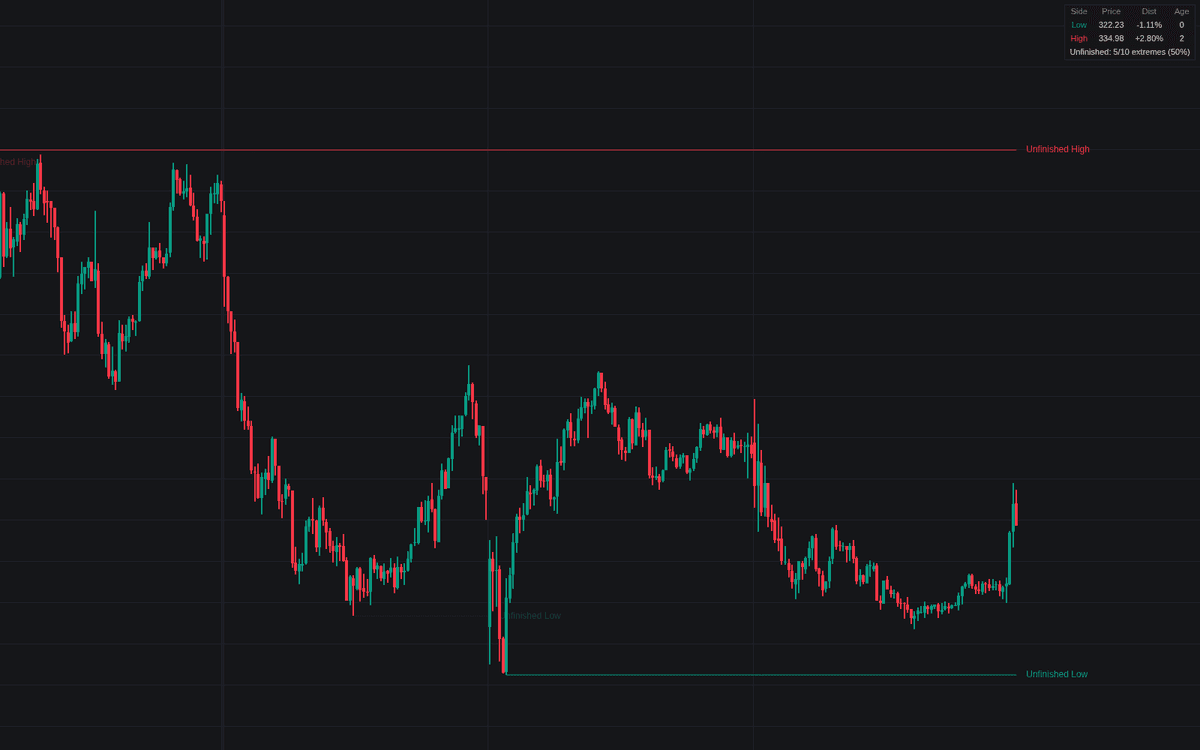

Unfinished Auction audits each completed session's extremes and keeps the failures on the chart as live reference levels, the concept's first dedicated library build. Each period, daily by default, is profiled into rows once complete; a high or low missing the single-print tail of a finished move, printing instead flat stacked structure on real participation or an extreme cut short by the closing bell, is flagged as an unfinished auction and extended right until price returns to repair it.
How to Trade the Unfinished Auction?
- New reference: the move stopped without resolution there, and markets tend to revisit open questions; both sides alert.
- Repair: price trading at or through the old extreme, per the Repair On rule, resolves the level, dims it to dotted if kept, and fires a repaired alert.
- Dashboard: open references ranked by distance with their age in sessions, plus the share of recent extremes left unfinished.
Run the chart well below the session timeframe; the dashboard warns when sessions hold too few bars to audit.
Unfinished Auction Settings
- Auction Session (default D): the audited timeframe.
- Profile Rows (default 24): TPO-style rows the completed range is divided into.
- Minimum Excess Tail (default 2): single-print rows required for a finished extreme.
- Minimum Stacked TPOs (default 2): bars in the extreme row for the flat read.
- Flag Closing-Bell Extremes (default on, 1 bar) and Volume Corroboration (default on, Ratio 1.0): the clock-cut and participation checks.
- Repair On (default Trade Through), Show Repaired Levels (on), Maximum References (default 50): the level book.
- Show Dashboard (on, Top Right, Small) with Auction Quality Lookback (default 20); style: Line Style (Solid), Line Width (1), Show Labels (on).
Frequently Asked Questions

Original indicatorBuilt in-house by LuxAlgo
The Library is free. Quant makes it yours.
Pull any concept or indicator into Quant: rebuild it, retune it, or turn it into a backtested strategy of your own.