One-timeframing
 By LuxAlgoMar 12, 2026
One-timeframing is an indicator on Vela, our next-generation charting platform, written in Pine Script®.
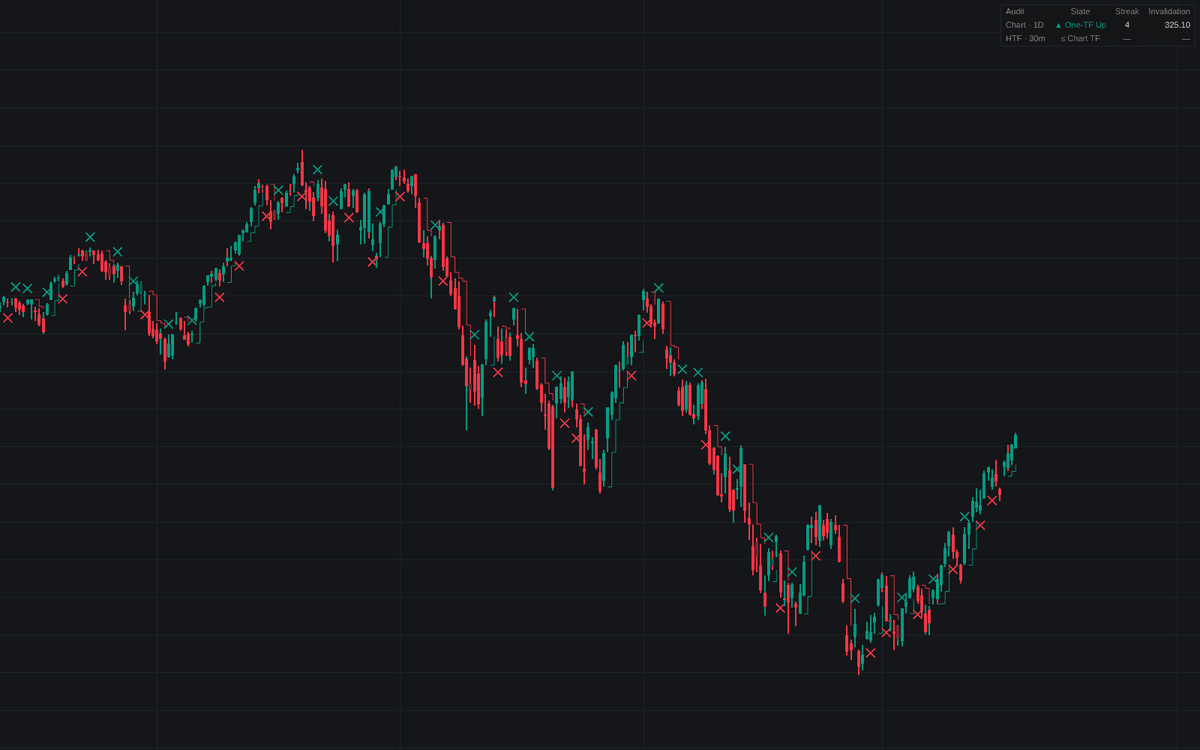

One-timeframing audits completed periods for the auction-theory control test of one-timeframing: an up sequence holds every prior period's low, a down sequence every prior high. The audit runs twice (on each chart bar and on a higher timeframe bracket, 30-minute by default, accumulated from chart bars so nothing repaints) and shows as bar coloring, rolling invalidation step lines, break crosses, a bracket background tint, and a dashboard with each audit's state, streak, and invalidation price.
How to Trade the One-timeframing?
- One-TF Up / One-TF Down: one side is running the auction. Trade with it rather than fade it.
- Invalidation Level: the prior period's opposite extreme, rolled forward each completed period: the first trade through it ends the sequence; the natural stop line.
- Break markers: a cross prints at the violated side; a close beyond upgrades the break from probe to acceptance, each with its own alert.
- HTF background: the bracket is one-timeframing. Entries against it fight the side in control.
Inside periods (holding the extreme without extending the range) tint lighter: the sequence survives but has stalled. Alerts cover starts, continuations, breaks, and accepted breaks on both audits, a staple of the volume and order-flow family.
One-timeframing Settings
- Minimum Sequence Length (default 2): completed periods before a sequence counts as active.
- Equal Extreme Holds (default enabled): a period that only matches the prior extreme keeps the sequence alive; disable for the stricter reading.
- Run Higher Timeframe Audit (default enabled) and Bracket Timeframe (default 30).
- Show Dashboard (default enabled), plus Position and Size.
- Style toggles: Color Bars, Invalidation Level, HTF Invalidation Level, Break Markers, HTF Background, all enabled by default.
Frequently Asked Questions
Free to use
Run it on Vela. Go further with a paid plan.
- Up to 500 Custom Alerts, with webhook automation
- Up to 10× the chart history of Free
- Orderflow lookback up to full history
- More Quant usage to customize it, plus extra usage when you need it
- Futures data alongside crypto, stocks, forex and commodities

Related indicators
Run it on Vela. Make it yours with Quant.
Open this indicator free on Vela, our next-generation charting platform. Then ask Quant, our coding agent built into Vela, to retune it or turn it into a backtested strategy of your own.