Rotation Factor
 By LuxAlgoMay 31, 2026
Rotation Factor is an indicator on Vela, our next-generation charting platform, written in Pine Script®.
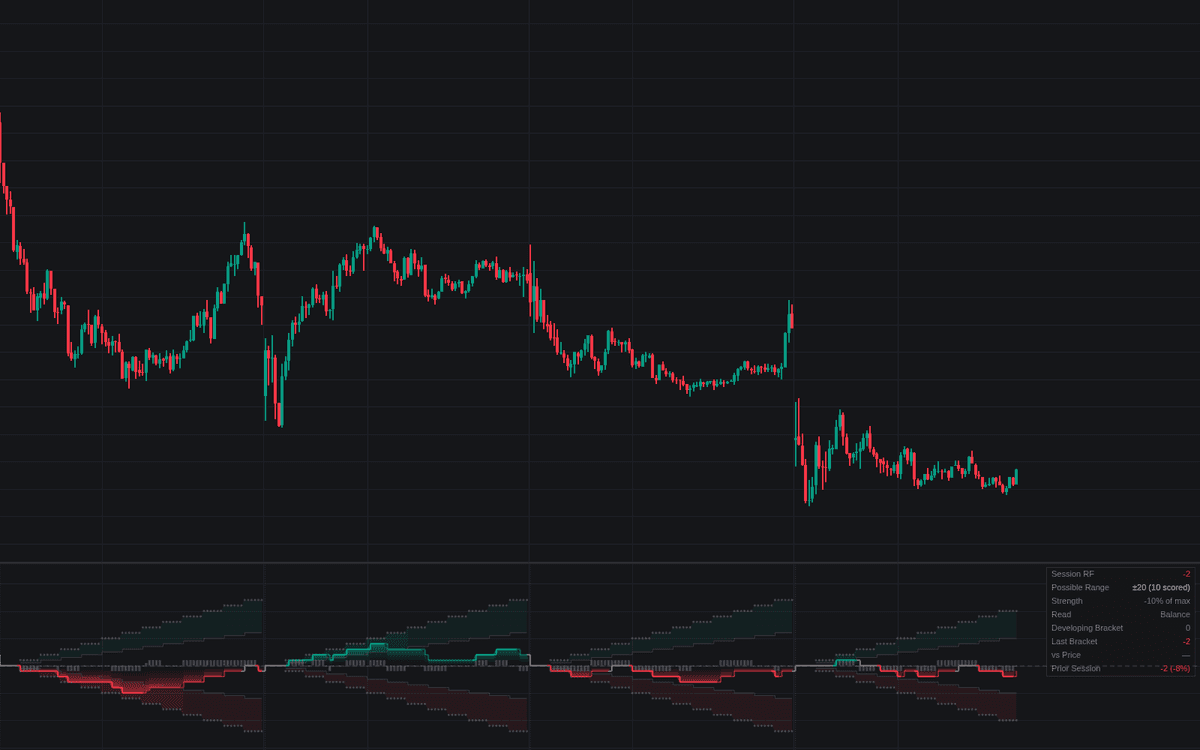

Rotation Factor keeps Market Profile's period-by-period auction score automatically: each finished 30-minute TPO bracket scores against its predecessor (+1 per higher extreme, -1 per lower, 0 for unchanged) and the running total plots as a stepline resetting each session. The definitive build of the rotation factor judges the count against the session's own possible range (±2 per scored bracket) with strong-rotation levels as a share of that range rather than a fixed number.
How to Trade the Rotation Factor?
- One-sided counts: a total holding beyond the strong-rotation levels says one side keeps winning the auctions, an argument for trend-day tactics.
- Balance: totals inside the balance band read as a two-sided auction, favoring responsive trades around the edges.
- Effort versus result: the dashboard compares the count's direction with the session's net price change. Strong rotation without progress warns of absorption, worth checking against the volume and order-flow tools.
Six alerts cover strong rotation, sign flips, the divergence and the session lock-in.
Rotation Factor Settings
- Session Anchor (default D): session the tally runs over and resets on; choose deliberately on 24-hour markets.
- TPO Bracket (default 30): one bracket's duration, the statistic's only real parameter; must not be below the chart timeframe.
- Strong Rotation Threshold % (default 50): share of the possible range that reads as strongly one-sided.
- Balance Band % (default 15): share of the range that reads as balance.
- Show Dashboard (default enabled) with Position (default Top Right) and Size (default Small).
- Style toggles draw the score columns, gradient fill, range envelope, threshold levels and session breaks (all default enabled).
Frequently Asked Questions
Free to use
Run it on Vela. Go further with a paid plan.
- Up to 500 Custom Alerts, with webhook automation
- Up to 10× the chart history of Free
- Orderflow lookback up to full history
- More Quant usage to customize it, plus extra usage when you need it
- Futures data alongside crypto, stocks, forex and commodities

Related indicators
Run it on Vela. Make it yours with Quant.
Open this indicator free on Vela, our next-generation charting platform. Then ask Quant, our coding agent built into Vela, to retune it or turn it into a backtested strategy of your own.