Killzones
Killzones, also known as per-session delivery expectations, are Smart Money Concepts / ICT concepts. The Library holds 2 implementations, each one a working definition you can pull into Quant.
Asia/London/NY AM/NY PM/London close
Top Killzones indicators
The top custom implementations, built on the original standard Killzones formula.
2 total
Every Killzones implementation here is strategy-ready: open one in Quant, set your rules, and it backtests automatically.
.png&w=3840&q=75)
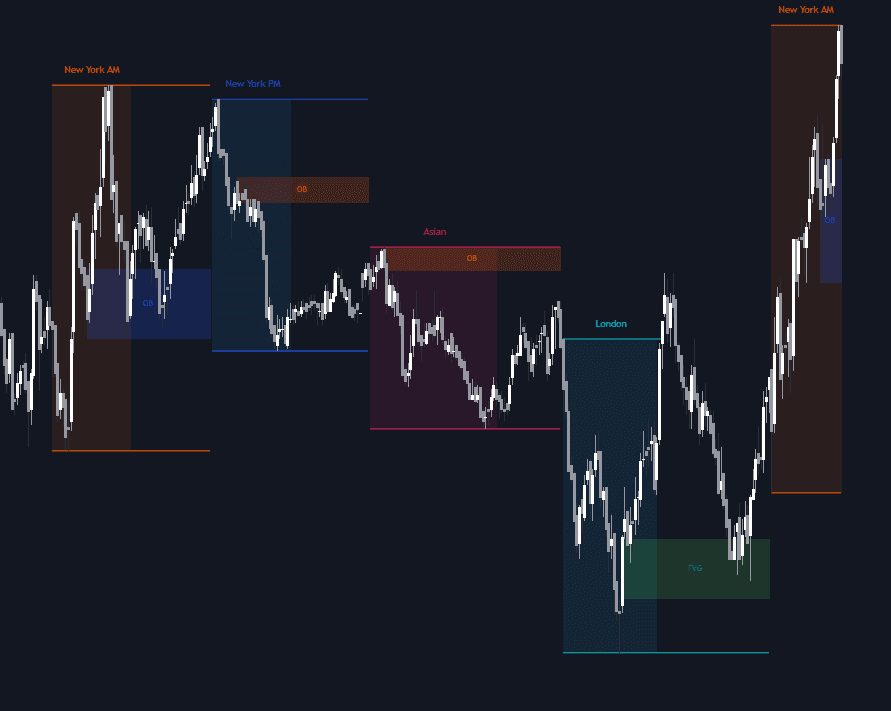
What are Killzones?
Killzones are the windows of the trading day when ICT (Inner Circle Trader) methodology expects institutional participation, and therefore tradeable displacement, to concentrate. The standard set, conventionally quoted in New York time, is the Asian killzone (roughly 8:00–10:00 pm), London open (2:00–5:00 am), New York AM (7:00–10:00 am), London close (10:00 am–12:00 pm) and New York PM (1:30–4:00 pm). Exact boundaries vary by source and instrument, which is why most traders anchor their charts to New York time and treat the edges as soft.
Each window carries its own delivery expectation. Asia tends to build a range that later sessions raid. London open frequently sets the high or low of the day, often via a Judas swing, a false push that runs the stops beyond an obvious level before reversing. New York AM delivers the day's main expansion or reverses what London built; London close leans corrective; New York PM makes the last push into settlement. These are tendencies with real failure rates, not rules: a killzone is a time filter under a price model, never a signal by itself.
The windows matter because intraday volatility is not evenly distributed: participation clusters around session opens and overlaps, so a setup that prints inside a killzone is more likely to be engaging genuine order flow, while the same pattern in the dead hours between sessions more often drifts or chops. Filtering by time also disciplines the trader: the day narrows to a few windows actually worth watching.
How to mark killzones on a chart
Killzones are defined by the clock rather than by price action, so marking them is mechanical; the skill is in reading what price does inside them.
- 1Set the chart's timezone to New York. Killzone boundaries are quoted in New York time; a chart left on UTC or local time puts the windows on the wrong candles, and daylight-saving weeks make the error worse.
- 2Shade the windows you trade: Asia (~8:00–10:00 pm), London open (2:00–5:00 am), New York AM (7:00–10:00 am), London close (10:00 am–12:00 pm), New York PM (1:30–4:00 pm). Most traders mark only the two or three they can actually sit through.
- 3Carry each window's high and low forward (the Asian range and the London extreme especially) because later sessions often trade back to those levels.
- 4At each window's open, classify the first move: an immediate run of a prior extreme that stalls and reverses suggests manipulation before the real delivery; steady one-sided expansion suggests the move is already underway.
How it's calculated
Fixed intraday time windows, anchored to the New York clock, that box off when each trading session's liquidity runs and directional moves are expected to occur.
Window boundaries differ by 30 to 90 minutes across ICT sources and platforms; the times above are the most widely cited set.
There is no indicator formula beyond the window high and low; killzones are clock filters layered under other ICT tools.
How traders use it
- As a time filter on entry models: many traders only take a setup, such as an optimal trade entry retracement or a fair value gap return, when it prints inside a killzone, on the logic that a level without participation behind it is just a line on the chart.
- To frame the daily narrative: Asia builds the range, London runs one side of it, New York continues or reverses. Reading the day as one accumulation–manipulation–distribution cycle pinned to the killzones is the classic template.
- As scaffolding for named time models: the Silver Bullet trades fixed one-hour windows (3–4 am, 10–11 am and 2–3 pm New York) that sit inside or beside the killzones, and ICT macros mark discrete ~20-minute delivery windows inside and around them.
- To pre-select targets: the highs and lows each window leaves behind become session liquidity for the next one, so traders project the Asian range or the London extreme forward as the draw for New York.
Killzones vs other time-of-day concepts
Trading Sessions: A session is the full span of a regional market's hours: Tokyo, London, New York. A killzone is a narrow slice of one, usually around its open or close, where the meaningful delivery is expected. Every killzone sits inside a session; most of a session is not a killzone.
ICT Macros: Macros go a level finer: specific ~20-minute windows (9:50–10:10 am New York, for example) when the delivery algorithm is said to reach for liquidity. Killzones set the hunting hours; macros are the minutes inside them that traders watch for the actual run.
ICT Time Anchors: An anchor is a single clock moment (the midnight New York open, the 8:30 am or 9:30 am opens) whose price becomes a reference level for the rest of the day. A killzone is a duration to trade within; an anchor is an instant to measure from.
ICT Session Ranges: Session ranges are the price footprints the windows leave behind (the Asian range being the classic) whose highs and lows become later targets. The killzone is the time container; the session range is the price object it produces.
Concept family
Smart Money Concepts / ICT
55 concepts mapped · 55 in the Library
Killzones FAQ
Turn Killzones into a trading strategy.
Take any implementation from this page into Quant, then build on it, backtest it on real data, and keep refining it in conversation.